Showing posts with label vivo. Show all posts

Main Features of Vivo Z5x 2020 Triple Camera Android Smartphone

add
Vivo Z5x 2020 is released and available in the market from June 2020. Check out important features of Vivo Z5x 2020 which is listed below. Here we have listed only main features or primary features of the device and not the complete specification of the phone.

Along with important or notable features of Vivo Z5x 2020, you will also find additional details related to the device such as how to update software or firmware, how to root, how to enter download mode, how to enter recovery mode and more.
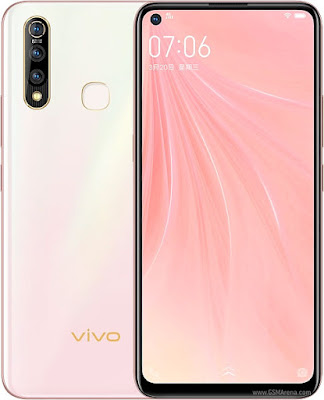
vivo-z5x-2020

Main Features of Vivo Z5x 2020:

SIM Type: 

Dual SIM (Nano-SIM, dual stand-by)

Display/Screen Type: 

6.53 inches, IPS LCD capacitive touchscreen, 1080 x 2340 pixels 
Corning Gorilla Glass 3 (Front)

Operating System (OS): 

Android 9.0 Pie; upgradable to Android 10, Funtouch 10

Chipset, CPU, GPU:

Qualcomm SDM712 Snapdragon 712 (10 nm)
Octa-core (2x2.3 GHz Kryo 360 Gold & 6x1.7 GHz Kryo 360 Silver)
Adreno 616


RAM: 

4/6/8 GB

Internal Memory: 

64/128 GB 

External Memory: 

microSDXC (dedicated slot)

Primary/Rear/Back Camera: 

16 MP, f/1.8, (wide), 1/2.8", 1.12µm, AF
8 MP, f/2.2, 16mm (ultrawide), 1/4.0", 1.12µm
2 MP, f/2.4, (depth)
LED flash, HDR, panorama
1080p@30fps

Secondary/Front Camera: 

16 MP, f/2.0, 26mm (wide), 1/3.1", 1.0µm
1080p@30fps

Battery: 

Non-removable Li-Po 5000 mAh battery
Fast battery charging 18W

Others: Fingerprint (rear-mounted), accelerometer, gyro, proximity, compass sensors. The phone is available in Black, Blue, White, Dark Blue colors. 

The price of the phone at the time of this post (June 2020) is - Rs.13500 (approx)

Vivo Z5x 2020 Download Mode: 

To boot into download mode, first switch off your phone and press and hold Volume Down+Power button together [long press until a confirmation screen appear]. Now press Volume Up button to boot into download mode. Download mode is required when you wish to update or flash firmware or root your device.

Vivo Z5x 2020 Recovery Mode:

To enter into recovery mode, first switch off your phone and press and hold Volume Up+Power button together [long press until Vivo logo appears on screen, and wait a moment]. From the recovery screen you can do multiple task such as- 
apply update from ADB
apply update from external storage
wipe data/factory reset
wipe cache partition
apply update from cache 

Latest firmware for Vivo Z5x 2020:

In this section you will find latest official firmware available for your device along with complete installation instructions. Check out latest stock firmware for the device from the below link.

Official firmware for Vivo Z5x 2020 

[if the link is not active then check back later for active link]

Root Vivo Z5x 2020:

In this section you will find working root method available for your device along with complete rooting instructions. Check out working root methods for the device from the below link.

How to Root Vivo Z5x 2020  

[if the link is not active then check back later for active link]   

If you are looking for anything other information related to Vivo Z5x 2020 then feel free to contact with us using our contact form or drop a comment in the below comment section. 
add2
Share:

Main Features of vivo iQOO Neo 855 Racing 16 MP Selfie with 12 GB RAM

add
Vivo iQOO Neo 855 Racing is released and  available in the market from December 12, 2019. Check out important features of Vivo iQOO Neo 855 Racing  which is listed below. Here we have listed only main features or primary features of the device and not the complete specification of the phone.

Along with important or notable features of Vivo iQOO Neo 855 Racing, you will also find additional details related to the device such as how to update software or firmware, how to root, how to enter download mode, how to enter recovery mode and more.

Main Features of Vivo iQOO Neo 855 Racing:

SIM Type: 

Dual SIM (Nano-SIM, dual stand-by)

Display/Screen Type: 

6.38 inches, Super AMOLED Capacitive touchscreen, 1080 x 2340 pixels 

Operating System (OS): 

Android 9.0 (Pie), Funtouch 9.0

Chipset, CPU, GPU:

Qualcomm SM8150 Snapdragon 855+ (7 nm)
Octa-core (1x2.96 GHz Kryo 485 & 3x2.42 GHz Kryo 485 & 4x1.8 GHz Kryo 485)
Adreno 640 (700 MHz)

RAM: 

8 GB or 12 GB

Internal Memory: 

128 GB, UFS3.0

External Memory: 

No

Primary/Rear/Back Camera: 

12 MP, f/1.8, 1/2.55", 1.4µm, dual pixel PDAF
8 MP, f/2.2, (wide)
2 MP, f/2.4, depth sensor
LED flash, HDR, panorama
2160p@30fps, 1080p@30fps

Secondary/Front Camera: 

16 MP, f/2.0, 26mm (wide), 1/3.1", 1.0µm
HDR, 1080p@30fps

Battery: 

Non-removable Li-Po 4500 mAh battery
Fast battery charging 33W

Vivo iQOO Neo 855 Racing Download Mode: 

To boot into download mode, first switch off your phone and press and hold Volume Down+Power button together [long press until a confirmation screen appear]. Now press Volume Up button to boot into download mode. Download mode is required when you wish to update or flash firmware or root your device.

Vivo iQOO Neo 855 Racing Recovery Mode:

To enter into recovery mode, first switch off your phone and press and hold Volume Up+Power button together [long press until Vivo logo appears on screen, and wait a moment]. From the recovery screen you can do multiple task such as- 
apply update from ADB
apply update from external storage
wipe data/factory reset
wipe cache partition
apply update from cache 

Latest firmware for Vivo iQOO Neo 855 Racing:

In this section you will find latest official firmware available for your device along with complete installation instructions. Check out latest stock firmware for the device from the below link.

Official firmware for Vivo iQOO Neo 855 Racing 

[if the link is not active then check back later for active link]

Root Vivo iQOO Neo 855 Racing:

In this section you will find working root method available for your device along with complete rooting instructions. Check out working root methods for the device from the below link.

How to Root Vivo iQOO Neo 855 Racing  

[if the link is not active then check back later for active link]   

If you are looking for anything other information related to Vivo iQOO Neo 855 Racing then feel free to contact with us using our contact form or drop a comment in the below comment section. 
add2
Share:

Main Features of Vivo U20 16MP Selfie with 6 GB RAM

add
Vivo U20 is released and  available in the market from November, 2019. Check out important features of Vivo U20  which is listed below. Here we have listed only main features or primary features of the device and not the complete specification of the phone.

Along with important or notable features of Vivo U20, you will also find additional details related to the device such as how to update software or firmware, how to root, how to enter download mode, how to enter recovery mode and more.

Main Features of Vivo U20:

SIM Type: 

Dual SIM (Nano-SIM, dual stand-by)

Display/Screen Type: 

6.53 inches, IPS LCD Capacitive touchscreen, 1080 x 2340 pixels 

Operating System (OS): 

Android 9.0 (Pie), Funtouch 9.0

Chipset, CPU, GPU:

Qualcomm SDM675 Snapdragon 675 (11 nm)
Octa-core (2x2.0 GHz Kryo 460 Gold & 6x1.7 GHz Kryo 460 Silver)
Adreno 612

RAM: 

6 GB

Internal Memory: 

64 GB

External Memory: 

microSD, up to 256 GB

Primary/Rear/Back Camera: 

16 MP, f/1.8, (wide), PDAF
8 MP, f/2.2, 13mm (ultrawide)
2 MP, f/2.4, macro camera
LED flash, HDR, panorama
1080p@30fps

Secondary/Front Camera: 

16 MP, f/2.0
HDR, 1080p@30fps

Battery: 

Non-removable Li-Po 5000 mAh battery
Fast battery charging 18W

Vivo U20 Download Mode: 

To boot into download mode, first switch off your phone and press and hold Volume Down+Power button together [long press until a confirmation screen appear]. Now press Volume Up button to boot into download mode. Download mode is required when you wish to update or flash firmware or root your device.

Vivo U20 Recovery Mode:

To enter into recovery mode, first switch off your phone and press and hold Volume Up+Power button together [long press until Vivo logo appears on screen, and wait a moment]. From the recovery screen you can do multiple task such as- 
apply update from ADB
apply update from external storage
wipe data/factory reset
wipe cache partition
apply update from cache 

Latest firmware for Vivo U20:

In this section you will find latest official firmware available for your device along with complete installation instructions. Check out latest stock firmware for the device from the below link.

Official firmware for Vivo U20 

[if the link is not active then check back later for active link]

Root Vivo U20:

In this section you will find working root method available for your device along with complete rooting instructions. Check out working root methods for the device from the below link.

How to Root Vivo U20  

[if the link is not active then check back later for active link]   

If you are looking for anything other information related to Vivo U20 then feel free to contact with us using our contact form or drop a comment in the below comment section. 
add2
Share:

Main Features of Vivo S5 32 MP Selfie with 8 GB RAM

add
Vivo S5 is released and  available in the market from November, 2019. Check out important features of Vivo S5  which is listed below. Here we have listed only main features or primary features of the device and not the complete specification of the phone.

Along with important or notable features of Vivo S5, you will also find additional details related to the device such as how to update software or firmware, how to root, how to enter download mode, how to enter recovery mode and more.

Main Features of Vivo S5:

SIM Type: 

Dual SIM (Nano-SIM, dual stand-by)

Display/Screen Type: 

6.44 inches, Super AMOLED Capacitive touchscreen, 1080 x 2400 pixels 

Operating System (OS): 

Android 9.0 (Pie), Funtouch 9.2

Chipset, CPU, GPU:

Qualcomm SDM712 Snapdragon 712 (10 nm)
Octa-core (2x2.3 GHz Kryo 360 Gold & 6x1.7 GHz Kryo 360 Silver)
Adreno 616

RAM: 

8 GB

Internal Memory: 

128 GB

External Memory: 

microSD, up to 128 GB

Primary/Rear/Back Camera: 

48 MP, f/1.8, (wide), 1/2", 0.8µm, PDAF
8 MP, f/2.2, 13mm (ultrawide), 1/4", 1.12µm
2 MP, f/2.4, 1/5", 1.75µm (dedicated macro camera)
5 MP, f/2.4, depth sensor
LED flash, HDR, panorama
2160p@30fps, 1080p@30fps

Secondary/Front Camera: 

32 MP, f/2.4, 0.8µm
HDR, 1080p@30fps

Battery: 

Non-removable Li-Po 4100 mAh battery
Fast battery charging 22.5W

Vivo S5 Download Mode: 

To boot into download mode, first switch off your phone and press and hold Volume Down+Power button together [long press until a confirmation screen appear]. Now press Volume Up button to boot into download mode. Download mode is required when you wish to update or flash firmware or root your device.

Vivo S5 Recovery Mode:

To enter into recovery mode, first switch off your phone and press and hold Volume Up+Power button together [long press until Vivo logo appears on screen, and wait a moment]. From the recovery screen you can do multiple task such as- 
apply update from ADB
apply update from external storage
wipe data/factory reset
wipe cache partition
apply update from cache 

Latest firmware for Vivo S5:

In this section you will find latest official firmware available for your device along with complete installation instructions. Check out latest stock firmware for the device from the below link.

Official firmware for Vivo S5 

[if the link is not active then check back later for active link]

Root Vivo S5:

In this section you will find working root method available for your device along with complete rooting instructions. Check out working root methods for the device from the below link.

How to Root Vivo S5  

[if the link is not active then check back later for active link]   

If you are looking for anything other information related to Vivo S5 then feel free to contact with us using our contact form or drop a comment in the below comment section. 
add2
Share:

Main Features of Vivo Y5s, 6GB RAM, 16MP Triple Cam, 5000mAh Fast Charging Android Phone

add
Vivo Y5s announced in November 2019 and will be released in November 2019. Check out important features of Vivo Y5s which is listed below. Here we have listed only main features or primary features of the device and not the complete specification of the phone.

Along with important or notable features of Vivo Y5s, you will also find additional details related to the device such as how to update software or firmware, how to root, how to enter download mode, how to enter recovery mode and more.
vivo-y5s-features

Main Features of Vivo Y5s:

SIM Type: 

Single SIM (Nano-SIM) or Dual SIM (Nano-SIM, dual stand-by)

Display/Screen Type: 

6.53 inches, LTPS, IPS LCD capacitive touchscreen, 1080 x 2340 pixels 

Operating System (OS): 

Android 9.0 (Pie); Funtouch 9.2

Chipset, CPU, GPU:

Mediatek MT6768 Helio P65 (12nm)
Octa-core (2x2.0 GHz Cortex-A75 & 6x1.7 GHz Cortex-A55)
Mali-G52 MC2

RAM: 

6 GB 

Internal Memory: 

128 GB

External Memory: 

MicroSD Upto 256GB

Primary/Rear/Back Camera: 

16 MP, f/1.8, (wide), PDAF
8 MP, f/2.2, 13mm (ultrawide)
2 MP, f/2.4, macro camera
LED flash, HDR, Panorama
1080p@30fps

Secondary/Front Camera: 

16 MP, f/2.0
HDR, 1080p@30fps 

Battery: 

Non-removable Li-Po 5000 mAh battery
Fast battery charging 18W
Power bank/Reverse charging 5W

Others: Fingerprint (rear-mounted), accelerometer, proximity, compass sensors. The phone will be available in Magnetic Black, Spring White, Blue colors. 

Vivo Y5s Download Mode: 

To boot into download mode, first switch off your phone and press and hold Volume Down+Power button together [long press until a confirmation screen appear]. Now press Volume Up button to boot into download mode. Download mode is required when you wish to update or flash firmware or root your device.

Vivo Y5s Recovery Mode:

To enter into recovery mode, first switch off your phone and press and hold Volume Up+Power button together [long press until Vivo logo appears on screen, and wait a moment]. From the recovery screen you can do multiple task such as- 
apply update from ADB
apply update from external storage
wipe data/factory reset
wipe cache partition
apply update from cache 

Latest firmware for Vivo Y5s:

In this section you will find latest official firmware available for your device along with complete installation instructions. Check out latest stock firmware for the device from the below link.

Official firmware for Vivo Y5s 

[if the link is not active then check back later for active link]

Root Vivo Y5s:

In this section you will find working root method available for your device along with complete rooting instructions. Check out working root methods for the device from the below link.

How to Root Vivo Y5s  

[if the link is not active then check back later for active link]   

If you are looking for anything other information related to Vivo Y5s then feel free to contact with us using our contact form or drop a comment in the below comment section. 
add2
Share:

Main Features of Vivo iQOO 12 MP Selfie and Triple Camera with 12 GB RAM

add
Vivo iQOO was released in March and  available in the market from March, 2019. Check out important features of Vivo iQOO  which is listed below. Here we have listed only main features or primary features of the device and not the complete specification of the phone.

Along with important or notable features of Vivo iQOO, you will also find additional details related to the device such as how to update software or firmware, how to root, how to enter download mode, how to enter recovery mode and more.

Main Features of Vivo iQOO:

SIM Type: 

Dual SIM (Nano-SIM, dual stand-by)

Display/Screen Type: 

6.41 inches, AMOLED Capacitive touchscreen, 1080 x 2340 pixels 

Operating System (OS): 

Android 9.0 (Pie), Funtouch 9

Chipset, CPU, GPU:

Qualcomm SDM855 Snapdragon 855 (7 nm)
Octa-core (1x2.84 GHz Kryo 485 & 3x2.41 GHz Kryo 485 & 4x1.78 GHz Kryo 485)
Adreno 640

RAM: 

6/8 GB or 8/12 GB

Internal Memory: 

128 GB or 256 GB

External Memory: 

No

Primary/Rear/Back Camera: 

12 MP, f/1.8, 1/2.55", 1.4µm, dual pixel PDAF
13 MP (ultrawide)
2 MP, f/2.4, depth sensor
LED flash, HDR, panorama
2160p@30fps, 1080p@30fps

Secondary/Front Camera: 

12 MP, HDR, 1080p@30fps

Battery: 

Non-removable Li-Ion 4000 mAh battery
Fast battery charging 44W

Vivo iQOO Download Mode: 

To boot into download mode, first switch off your phone and press and hold Volume Down+Power button together [long press until a confirmation screen appear]. Now press Volume Up button to boot into download mode. Download mode is required when you wish to update or flash firmware or root your device.

Vivo iQOO Recovery Mode:

To enter into recovery mode, first switch off your phone and press and hold Volume Up+Power button together [long press until Vivo logo appears on screen, and wait a moment]. From the recovery screen you can do multiple task such as- 
apply update from ADB
apply update from external storage
wipe data/factory reset
wipe cache partition
apply update from cache 

Latest firmware for Vivo iQOO:

In this section you will find latest official firmware available for your device along with complete installation instructions. Check out latest stock firmware for the device from the below link.

Official firmware for Vivo iQOO 

[if the link is not active then check back later for active link]

Root Vivo iQOO:

In this section you will find working root method available for your device along with complete rooting instructions. Check out working root methods for the device from the below link.

How to Root Vivo iQOO  

[if the link is not active then check back later for active link]   

If you are looking for anything other information related to Vivo iQOO then feel free to contact with us using our contact form or drop a comment in the below comment section. 
add2
Share:

Main Features of Vivo S1 25 MP Selfie and Triple camera with 6 GB RAM

add
Vivo S1 is released in March and  available in the market from April 1, 2019. Check out important features of Vivo S1  which is listed below. Here we have listed only main features or primary features of the device and not the complete specification of the phone.

Along with important or notable features of Vivo S1, you will also find additional details related to the device such as how to update software or firmware, how to root, how to enter download mode, how to enter recovery mode and more.

Main Features of Vivo S1:

SIM Type: 

Dual SIM (Nano-SIM, dual stand-by)

Display/Screen Type: 

6.53 inches, IPS LCD Capacitive touchscreen, 1080 x 2340 pixels 

Operating System (OS): 

Android 9.0 (Pie), Funtouch 9

Chipset, CPU, GPU:

Mediatek Helio P70 (12nm)
Octa-core (4x2.1 GHz Cortex-A73 & 4x2.0 GHz Cortex-A53)
Mali-G72 MP3

RAM: 

6 GB

Internal Memory: 

128 GB

External Memory: 

microSD, up to 256 GB

Primary/Rear/Back Camera: 

12 MP, f/1.8, PDAF
8 MP, f/2.2, (wide)
5 MP, f/2.4, depth sensor
LED flash, HDR, panorama
2160p@30fps, 1080p@30fps

Secondary/Front Camera: 

Motorized pop-up 25 MP, f/2.0
HDR, 1080p@30fps

Battery: 

Non-removable Li-Po 3940 mAh battery
Fast battery charging 18W

Vivo S1 Download Mode: 

To boot into download mode, first switch off your phone and press and hold Volume Down+Power button together [long press until a confirmation screen appear]. Now press Volume Up button to boot into download mode. Download mode is required when you wish to update or flash firmware or root your device.

Vivo S1 Recovery Mode:

To enter into recovery mode, first switch off your phone and press and hold Volume Up+Power button together [long press until Vivo logo appears on screen, and wait a moment]. From the recovery screen you can do multiple task such as- 
apply update from ADB
apply update from external storage
wipe data/factory reset
wipe cache partition
apply update from cache 

Latest firmware for Vivo S1:

In this section you will find latest official firmware available for your device along with complete installation instructions. Check out latest stock firmware for the device from the below link.

Official firmware for Vivo S1 

[if the link is not active then check back later for active link]

Root Vivo S1:

In this section you will find working root method available for your device along with complete rooting instructions. Check out working root methods for the device from the below link.

How to Root Vivo S1  

[if the link is not active then check back later for active link]   

If you are looking for anything other information related to Vivo S1 then feel free to contact with us using our contact form or drop a comment in the below comment section. 
add2
Share:

Main Features of Vivo V15 32 MP Selfie and Triple Camera with 6 GB RAM

add
Vivo V15 is released in March and  available in the market from March, 2019. Check out important features of Vivo V15  which is listed below. Here we have listed only main features or primary features of the device and not the complete specification of the phone.

Along with important or notable features of Vivo V15, you will also find additional details related to the device such as how to update software or firmware, how to root, how to enter download mode, how to enter recovery mode and more.

Main Features of Vivo V15:

SIM Type: 

Dual SIM (Nano-SIM, dual stand-by)

Display/Screen Type: 

6.53 inches, IPS LCD Capacitive touchscreen, 1080 x 2340 pixels 

Operating System (OS): 

Android 9.0 (Pie), Funtouch 9

Chipset, CPU, GPU:

Mediatek Helio P70 (12nm)
Octa-core (4x2.1 GHz Cortex-A73 & 4x2.0 GHz Cortex-A53)
Mali-G72 MP3

RAM: 

6 GB

Internal Memory: 

64/128 GB

External Memory: 

microSD, up to 256 GB

Primary/Rear/Back Camera: 

24 MP, f/1.8, 1/2.8", 1.12µm, Dual Pixel PDAF
8 MP, f/2.2, 13mm (ultrawide)
5 MP, f/2.4, depth sensor
LED flash, HDR, panorama
2160p@30fps, 1080p@30fps

Secondary/Front Camera: 

Motorized pop-up 32 MP, f/2.0
HDR, 1080p@30fps

Battery: 

Non-removable Li-Po 4000 mAh battery
Fast battery charging

Vivo V15 Download Mode: 

To boot into download mode, first switch off your phone and press and hold Volume Down+Power button together [long press until a confirmation screen appear]. Now press Volume Up button to boot into download mode. Download mode is required when you wish to update or flash firmware or root your device.

Vivo V15 Recovery Mode:

To enter into recovery mode, first switch off your phone and press and hold Volume Up+Power button together [long press until Vivo logo appears on screen, and wait a moment]. From the recovery screen you can do multiple task such as- 
apply update from ADB
apply update from external storage
wipe data/factory reset
wipe cache partition
apply update from cache 

Latest firmware for Vivo V15:

In this section you will find latest official firmware available for your device along with complete installation instructions. Check out latest stock firmware for the device from the below link.

Official firmware for Vivo V15 

[if the link is not active then check back later for active link]

Root Vivo V15:

In this section you will find working root method available for your device along with complete rooting instructions. Check out working root methods for the device from the below link.

How to Root Vivo V15  

[if the link is not active then check back later for active link]   

If you are looking for anything other information related to Vivo V15 then feel free to contact with us using our contact form or drop a comment in the below comment section. 
add2
Share:

Main Features of Vivo X27 16 MP Selfie and Triple Camera with 8 GB RAM

add
Vivo X27 is released in March and  available in the market from March 23, 2019. Check out important features of Vivo X27  which is listed below. Here we have listed only main features or primary features of the device and not the complete specification of the phone.

Along with important or notable features of Vivo X27, you will also find additional details related to the device such as how to update software or firmware, how to root, how to enter download mode, how to enter recovery mode and more.

Main Features of Vivo X27:

SIM Type: 

Dual SIM (Nano-SIM, dual stand-by)

Display/Screen Type: 

6.39 inches, Super AMOLED Capacitive touchscreen, 1080 x 2340 pixels 

Operating System (OS): 

Android 9.9 (Pie), Funtouch 9

Chipset, CPU, GPU:

Qualcomm SDM710 Snapdragon 710 (10 nm)
Octa-core (2x2.2 GHz 360 Gold & 6x1.7 GHz Kryo 360 Silver)
Adreno 616

RAM: 

8 GB

Internal Memory: 

256 GB

External Memory: 

microSD, up to 256 GB

Primary/Rear/Back Camera: 

48 MP, f/1.8, 1/2", 0.8µm, PDAF
13 MP, 13mm (ultrawide)
5 MP, f/2.4, depth sensor
LED flash, HDR, panorama
2160p@30fps, 1080p@30/60fps

Secondary/Front Camera: 

Motorized pop-up 16 MP
HDR, 1080p@30fps

Battery: 

Non-removable Li-Po 4000 mAh battery

Vivo X27 Download Mode: 

To boot into download mode, first switch off your phone and press and hold Volume Down+Power button together [long press until a confirmation screen appear]. Now press Volume Up button to boot into download mode. Download mode is required when you wish to update or flash firmware or root your device.

Vivo X27 Recovery Mode:

To enter into recovery mode, first switch off your phone and press and hold Volume Up+Power button together [long press until Vivo logo appears on screen, and wait a moment]. From the recovery screen you can do multiple task such as- 
apply update from ADB
apply update from external storage
wipe data/factory reset
wipe cache partition
apply update from cache 

Latest firmware for Vivo X27:

In this section you will find latest official firmware available for your device along with complete installation instructions. Check out latest stock firmware for the device from the below link.

Official firmware for Vivo X27 

[if the link is not active then check back later for active link]

Root Vivo X27:

In this section you will find working root method available for your device along with complete rooting instructions. Check out working root methods for the device from the below link.

How to Root Vivo X27  

[if the link is not active then check back later for active link]   

If you are looking for anything other information related to Vivo X27 then feel free to contact with us using our contact form or drop a comment in the below comment section. 
add2
Share:

Popular Posts

Infolinks In Text Ads

Translate

Copyright @NasirTech. Powered by Blogger.

Copyright © NasirTech | Powered by Blogger

Design by Anders Norén | Blogger Theme by NewBloggerThemes.com | Distributed By Blogger Templates20